MapLibreで距離・面積計測コントロールを作成
1. はじめに
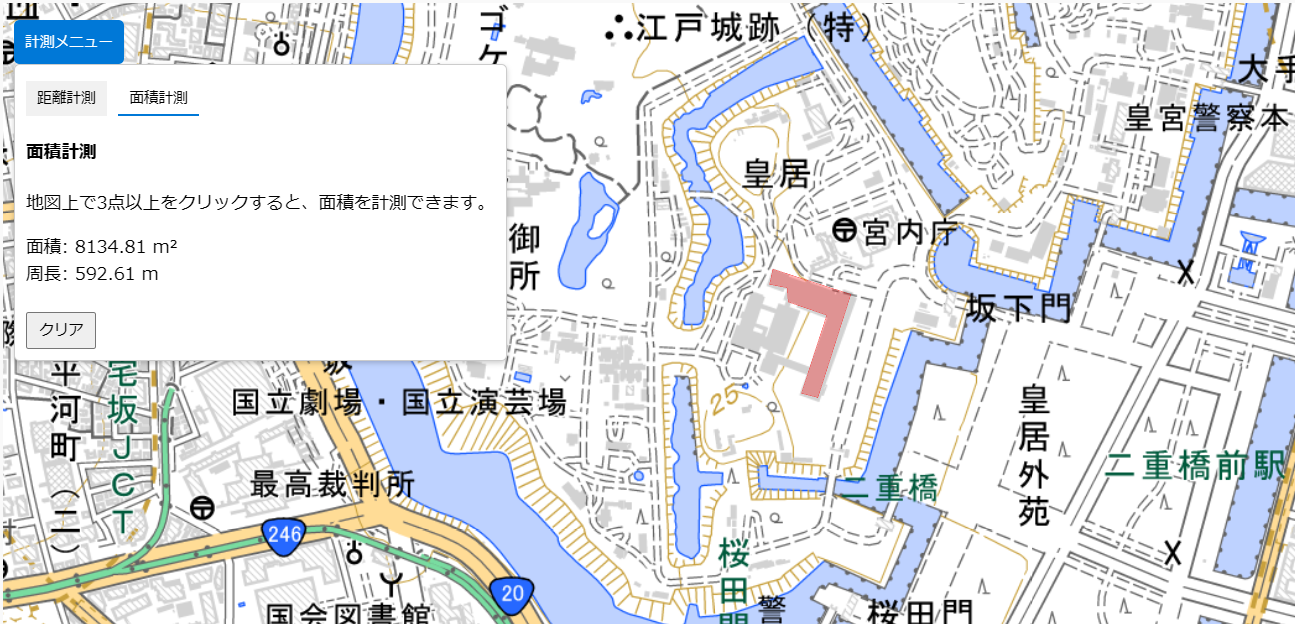
地図上で距離や面積を計測できるツールは、地理情報を扱う上で非常に便利です。今回は、MapLibreを用いて簡単に距離・面積を計測する機能を作成し、その使い方を紹介します。この計測ツールは以下のページからお試しいただけます。
2. 便利なポイント
- 直感的操作: 地図上をクリックするだけで簡単に距離や面積を計測可能。
- 地理院地図と統合: 国土地理院の淡色地図を利用して、正確な測定を実現。
- リアルタイム更新: 測定結果がすぐに表示されるため、即座に確認できます。
3. 機能説明
以下の機能を備えています。
- 距離計測: 任意の地点をクリックし、直線距離を測定。
- 面積計測: 三点以上を選択して多角形の面積を計算。
- クリア機能: 計測結果をリセットし、再測定可能。
4. HTMLコード
HTML・CSS・JSダウンロード:
ダウンロード
<div id="map"></div>
<div id="panel">
    <button id="toggle-panel">計測メニュー</button>
    <div id="panel-content">
        <div id="tabs">
            <button id="tab-distance" class="active">距離計測</button>
            <button id="tab-area">面積計測</button>
        </div>
        <div id="distance-content" class="content active">
            <p>距離: <span id="distance">0 m</span></p>
            <button id="clear-distance">クリア</button>
        </div>
        <div id="area-content" class="content">
            <p>面積: <span id="area">0 m²</span></p>
            <p>周長: <span id="perimeter">0 m</span></p>
            <button id="clear-area">クリア</button>
        </div>
    </div>
</div>
5. JavaScriptコード
const map = new maplibregl.Map({
    container: 'map',
    style: {
        version: 8,
        sources: {
            "gsi-blank": {
                type: "raster",
                tiles: ["https://cyberjapandata.gsi.go.jp/xyz/pale/{z}/{x}/{y}.png"],
                tileSize: 256,
                attribution: "地図データ © 国土地理院"
            }
        },
        layers: [{
            id: "gsi-blank-layer",
            type: "raster",
            source: "gsi-blank"
        }]
    },
    center: [139.6917, 35.6895],
    zoom: 5
});

// 距離計測の更新関数
function updateLine() {
    if (lineCoordinates.length > 1) {
        const line = turf.lineString(lineCoordinates);
        const distance = turf.length(line, { units: 'meters' });
        distanceDisplay.innerText = `${distance.toFixed(2)} m`;
    }
}

// 面積計測の更新関数
function updatePolygon() {
    if (polygonCoordinates.length > 2) {
        const polygon = turf.polygon([[...polygonCoordinates, polygonCoordinates[0]]]);
        const area = turf.area(polygon);
        const perimeter = turf.length(turf.lineString([...polygonCoordinates, polygonCoordinates[0]]), { units: 'meters' });
        areaDisplay.innerText = `${area.toFixed(2)} m²`;
        perimeterDisplay.innerText = `${perimeter.toFixed(2)} m`;
    }
}
6. CSSコード
body {
    margin: 0;
    padding: 0;
}
#map {
    position: absolute;
    top: 0;
    bottom: 0;
    width: 100%;
}
#panel {
    position: absolute;
    top: 10px;
    left: 10px;
    z-index: 100;
}
#toggle-panel {
    background: #0078d7;
    color: white;
    border: none;
    padding: 10px;
    cursor: pointer;
    border-radius: 5px;
}
7. 結論
この計測ツールを活用することで、MapLibreを使った地図操作がさらに便利になります。特に距離や面積の計測を直感的に行いたい場合に役立ちます。
#MapLibre #距離計測 #面積計測 #地図ツール #国土地理院 #GIS #WebGIS #地理情報 #JavaScript #地図開発 #オープンソース
コメント